Free Animate
By: Rig Shift
Maturity: Moderate
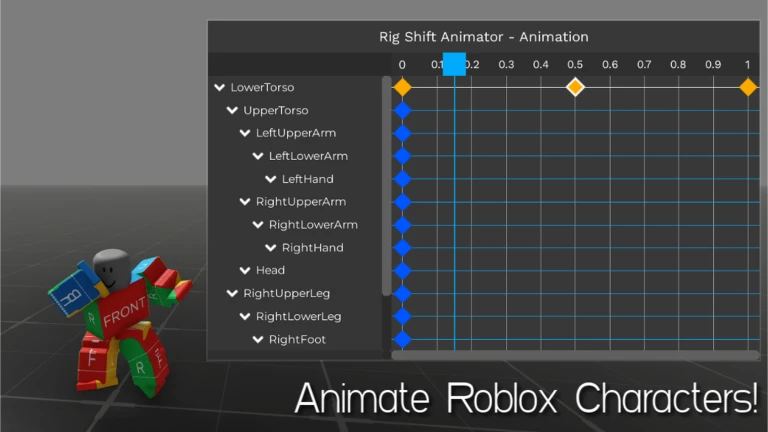
Welcome to Free Animate! Create custom Roblox animations with R15, R6, Rthro, or any player’s avatar. Save your creations in-game or upload them to Roblox Studio using our plugin: https://create.roblox.com/store/asset/129944515085860/Export-Animation \-- PC Controls R – Toggle between Rotation and Movement J – Toggle Free Camera Y – Toggle between Local and World space B – Toggle Onion Skin Q – Play animation Ctrl + C/V/X – Copy, Paste, Cut keyframes Ctrl + Z/Y – Undo, Redo Backspace – Delete keyframe < / > – Snap to keyframes \= – Add keyframe at current pose N – Add reset keyframe The controls can be changed in-game to fit your preferences. This game is available on mobile, PC, and console (with keyboard and mouse support). The Constant easing style can be used when no easing is applied. Note: This game is currently in beta, so you may encounter some bugs. If you find any, please let us know. Additional features are coming soon. Credit to ArlianaFluffyWolfy for the icon
- Playing now
- 125
- Record
- 125
- Visits
- 14.2M+
Record: 125 players (November 8, 2026)
Player count
The filled area is the average of each interval, the dashed line the highest value in it.
Hourly new visits
Visits added to the game's total.
Hourly new favorites
People who added the game to their favorites.
Like ratio
Likes as a share of all likes and dislikes.
This game is measured every hour · last measured 10 hours ago · tracked since Nov 8, 2026
Description
Welcome to Free Animate!
Create custom Roblox animations with R15, R6, Rthro, or any player’s avatar. Save your creations in-game or upload them to Roblox Studio using our plugin: https://create.roblox.com/store/asset/129944515085860/Export-Animation
\-- PC Controls
R – Toggle between Rotation and Movement
J – Toggle Free Camera
Y – Toggle between Local and World space
B – Toggle Onion Skin
Q – Play animation
Ctrl + C/V/X – Copy, Paste, Cut keyframes
Ctrl + Z/Y – Undo, Redo
Backspace – Delete keyframe
< / > – Snap to keyframes
\= – Add keyframe at current pose
N – Add reset keyframe
The controls can be changed in-game to fit your preferences.
This game is available on mobile, PC, and console (with keyboard and mouse support). The Constant easing style can be used when no easing is applied.
Note: This game is currently in beta, so you may encounter some bugs. If you find any, please let us know. Additional features are coming soon.
Credit to ArlianaFluffyWolfy for the icon
More
- Likes
- 27,144 (94%)
- Dislikes
- 1,797
- Subgenre
- —
- Avatar
- Player choice
- Private Servers
- No
- Record Date
- Nov 8, 2026
- Universe ID
- 7661318725
Badges
Rarity shows the share of the game's players who earned the badge.
Join the conversation
Score games from 1 to 10, start polls, follow players and get replies.
Game Passes
About Free Animate
Free Animate is a Roblox Utility & Other game made by Rig Shift. 125 people are playing it right now; it has 14,169,444 visits in total and 135,004 people have favorited it. 94% of players like it (27,144 likes, 1,797 dislikes). The highest concurrent player count we've measured is 125 (Nov 8, 2026). It was created on May 8, 2025 and last updated on Nov 5, 2026.
Frequently asked
- How many people are playing Free Animate right now?
- Free Animate is being played by 125 people right now. We measure popular games every minute.
- How many visits does Free Animate have?
- Free Animate has been visited 14,169,444 times in total.
- What is Free Animate's player record?
- The highest concurrent player count we've measured is 125; the record was set on Nov 8, 2026.
- Who made Free Animate?
- Free Animate was made by the Roblox community Rig Shift.
- When did Free Animate come out?
- Free Animate was created on May 8, 2025 and last updated on Nov 5, 2026.
People Also Join
Popular Utility & Other games
 NEW





 NEW